Comparison
A BetterDisplay alternative, if saved setups are what you came for.
MoreDisplays saves a display arrangement under a name and puts the whole machine into it in one action. It costs 10 euro on trust, it is signed and notarised, and it is narrower than BetterDisplay on purpose.
This page is written by the people who make MoreDisplays, so treat it as a description of this app rather than a verdict on another one. Everything below is a claim about what MoreDisplays does, which you can check against the manual, or against the app itself in about a minute.
Drawn to scale. The rectangle on the left is a Mac with nothing attached. Everything to the right of the break is a saved group, one action away from being the machine you are looking at.
The short version
Worth trying if
- You keep rebuilding the same display setup by hand, at more than one desk or on more than one Mac.
- You reach a Mac over screen sharing, VNC, Jump Desktop or Apple Remote Desktop, and you want the display to be the shape of the thing you are looking at.
- You want the switch to be scriptable, so a shell over SSH can do it with nothing plugged in.
- You would rather pay nothing, have no account, and decide for yourself later whether it was worth anything.
Not worth trying if
- You need a display utility with a wide surface. This one has a single window and a menu bar item, and it means to keep it that way.
- You want colour work: profiles, calibration, temperature, or measurement. It does none of that.
- You need the Mac reachable at the login window today. The service for that ships but is not finished.
- You want the machine to decide for itself which setup to use. There are no rules here, only switches you or your scripts throw.
What you were trying to do, and how this does it
Most people arrive at a display utility with one specific problem. These are the ones MoreDisplays is built for, in the order they usually turn up.
- Give a Mac with no monitor a usable desktop
- Make a virtual display at the size your client renders best, and it comes back by itself after a restart. Virtual displays
- Switch the whole machine between two desks
- Save a group per desk. One action applies which displays exist, their resolution, refresh rate, rotation, position and which one owns the menu bar. Groups
- Get a resolution your monitor does not list
- On a display this app creates, name the panel and its pixels; HiDPI is a switch on top. On a monitor you own, the modes are the ones the panel offers. Templates and the catalogue
- Stop macOS resetting a resolution behind your back
- Mark a display protected. When a client renegotiates or a monitor wakes at its default, the whole arrangement is put back, not just the one mode. Protection
- Change a monitor's brightness from the Mac
- Sliders per display over DDC, for the controls the panel answers for, plus an option that sends the brightness keys to the display under the pointer. Brightness
- Do all of it without touching the window
- A global shortcut per group, a URL scheme, and a command line tool over a local socket, so a switch survives an SSH session with no screen attached. Switching without the window
One window, and it is this one
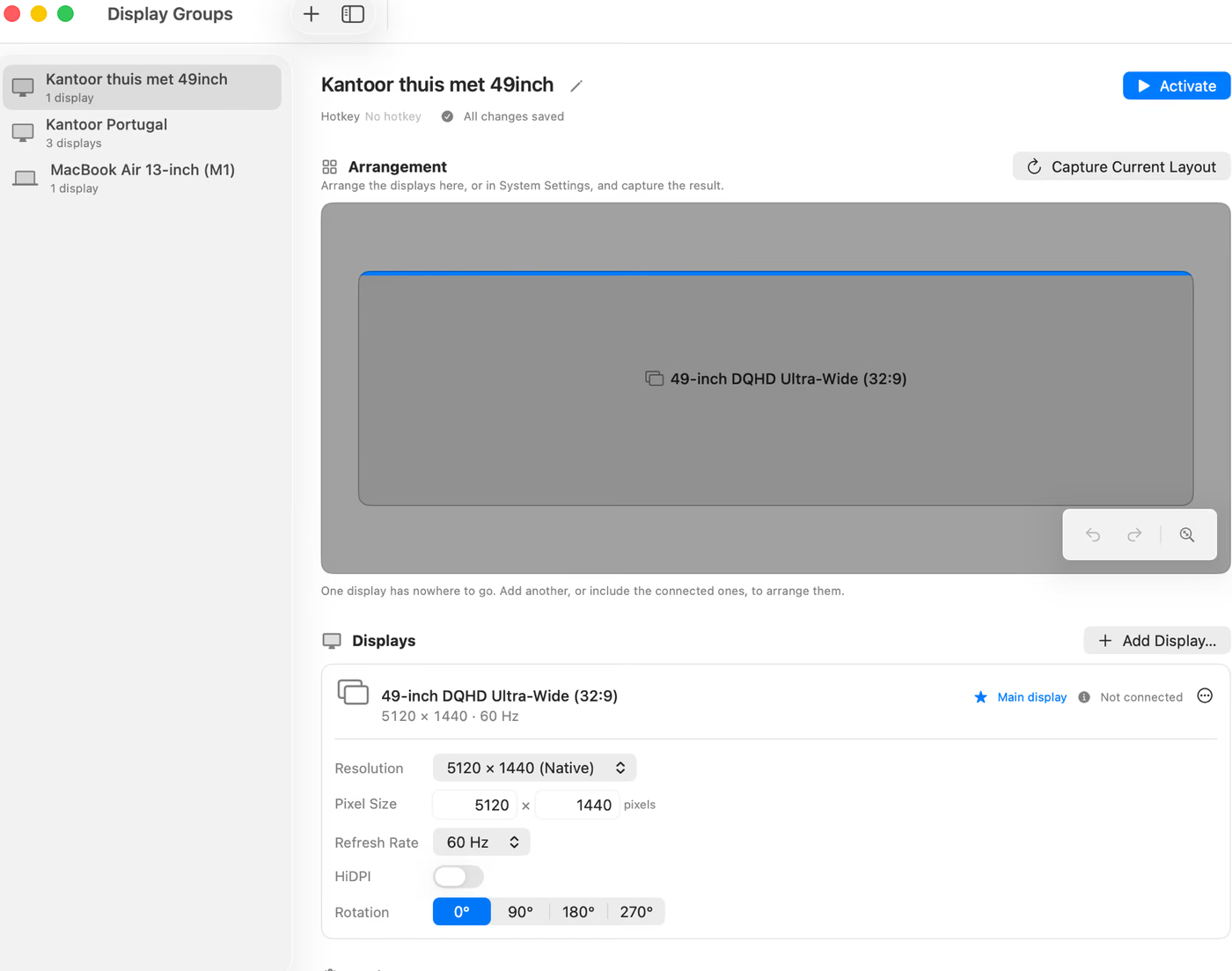
Groups on the left, the arrangement in the middle, the display you selected on the right. Drag a display and the numbers under it change with it. There is no second window, no inspector stack, and no preferences pane that repeats what the main window already shows.
The catalogue behind the plus button has 38 real panels in it, from Apple's external displays to iPads to the ultrawide formats nobody sells under one name.
Where it stops
A comparison page that only lists strengths is an advertisement. These are the things people ask for that this app does not do, and is not planning to.
- No streaming a display into a window
- It makes the display; showing it is your screen sharing client's job. There is no picture in picture, no mirror window, and no capture of one display into another.
- No colour management
- A display it creates can be HDR or reference mode, and that is where colour ends. No profile assignment, no calibration, no white point, no measurement.
- No rules or triggers
- Nothing watches for a client connecting and picks a group for you. Protection defends the setup you applied, which is a different thing from choosing one.
- Nothing at the login window, yet
- The app runs in your user session, so it cannot make a display before anybody has logged in. The privileged service that will close that gap ships inside the app, off by default, and does not serve yet. Keep a dummy plug for that window.
- Invented modes only on displays it made
- A monitor you own gets the modes its panel offers, read from the display rather than derived. The arbitrary sizes and HiDPI variants apply to the displays this app creates.
- Not on the App Store
- Creating a display needs interfaces the sandbox forbids, so it ships as a signed and notarised disk image with a published checksum instead.
If you already run something else
Quit the other display utility before you try this one. Not because they are known to fight: because two apps that both reconfigure displays make it impossible to tell which one moved something, and the first evening with a new tool is the worst time to be guessing.
Nothing is installed outside your user folder, and there is no helper to unregister. Dragging the app to the trash and removing one folder is the whole uninstall, which is also the honest way to make trying it cheap.
What it costs
Nothing. Nothing expires and no feature is behind a key. Payment is voluntary: after thirty days the app asks, once a month, whether it has been worth anything, and a key stops the asking permanently. Ten euro is the suggested amount, and it is a suggestion rather than a price, because nothing checks whether anything arrived and nothing can.
Nothing else is sent anywhere: no analytics, no cookies, no crash reporting. Groups sync through your own iCloud account if you want them to, which is between your Macs and Apple, and it is off until you switch it on.